Showing posts with label product reviews. Show all posts

Friday, May 20, 2011

five for friday

I've seen this iteration on many other blogs and thought it would be fun to do! One of the reasons that I don't seem to blog as much as I'd like is that I find these things I love and get bogged down and stressed with writing a full review. 'Five for Fridays' would be a great way to show some things I am loving, with just a little quick commentary.

I only recently learned about Woot.com, but it's kind of amazing. Usually pretty great deals on anything and everything, snarky commentary, knowledgeable forum members...and the adrenaline-raising woot-off spent waiting for the ever-elusive 'bag of crap.' Check out Lifehacker's Guide to Woot for a crash course.


Both productivity tools that I have been using to help stay on track on hold myself accountable. I started out with minimum restrictions, but quickly elevated them...now I rarely surf the web during 'work hours' and try and beat my time spent working. Rescuetime is a stand-alone program...the most basic version is free and that's probably all you'll need. StayFocused is a Chrome Extension, easy to add to the bookmark bar.


I knew a girl in college who used one of these and finally managed to track one down for myself. It's been a godsend during this particularly rainy May. Easy on the scalp, and gets my hair straight and dry. For volume and more body, I'll still use the round brush-and-dryer method, but this attachment is great for easy, casual days when I need to straighten quickly.


This wonderful new site for internet image clippers like me has been blogged about quite a bit in the last few weeks. My request to join was finally approved, and I've been pinning things left and right. I'm just starting to repin and follow others' boards. Much easier to generate idea boards then Polyvore, in my opinion.

Has also been blogged and reviewed ad nauseum, and with good reason. These things are amazing! I've never had luck with the Sephora nail stick-ons, but these are basically idiot-proof. I pick them up during Buy One, Get One 50% off sales at the drugstore, and get 2 uses out of each box. The glitters are great (you could never get that much coverage from the bottle), and the neons are perfect (never streaky like bottle polish). Dry to the touch on application, with no smell...they'd be perfect for a last-minute mani (if you have 10 minutes or so) just about anywhere. Oh and they really, truly last for over a week, chip-free!

Monday, April 25, 2011

review: GHD Classic Styler Hair Straightener

I didn't even begin to straighten my not-quite-curly, not-quite-straight hair until college. Seriously! My freshman year college roommate introduced me to the wonders of a round brush and a flat iron. What followed were 4 years of chatting with my girlfriends in one of our rooms, while we flat-ironed our hair into stick straight condition before going out. I managed to go through 3 (!) irons before graduating.

These days, I really limit my use of irons...it can be tough on hair to use regularly. I had an old Hot Tools piece that did the job for years...and then quietly stopped working a few weeks ago. At 30, I decided it was time to pony up and invest in a good straightener. After tons of research, I decided on the GHD Classic Styler. Although it does have the dubious distinction of being my most expensive beauty item to date ($185 retail oy!), the GHD isn't my first foray into expensive hair tools. I hemmed and hawed before buying my Solano Pro dryer, and have never looked back. With these types of things, you really do get what you pay for.

The first time I used the GHD was before dinner with friends on a rainy Saturday. I quickly blow-dried my hair (after coating with Moroccan Oil and Alterna Caviar Styling Tonic) and then used the straightener, working in 4 layers from the bottom up. I finished my thick, unruly mop in about 10 minutes (the Hot Tools took 20-30 minutes). The result was shiny hair that had amazing swing and movement, and felt so so soft. I've got nothing but good things to say...so here are a few notable pros:

* Heats up in no time...and beeps twice to let you know it's ready.
* There is no temperature setting, but this is a good thing! The tool adjusts the heat after sensing porosity in your hair.
* Automatically shuts off after 30 minutes of not being used (eliminating that nagging fear I always had of burning the house down).
* 9-foot cord is long, and has a swivel cord, which really useful for placing this on various surfaces (under a heat-safe sheath or thick towel, of course).
* The body surrounding the plates doesn't get too hot, so no worries of burning an ear or your forehead.
* Barrel is rounded. I'm still getting the hang of using the GHD to curl my hair!
* For frequent travelers, this styler automatically adjusts to international voltage.

I purchased mine from Folica with a 20% off plus free shipping code, and recently saw the GHD display ravaged at Sephora during their 15% off special for Beauty Insiders. Still not a steal, but better than full price!

Friday, February 18, 2011

how to dremel a dog's nails


Griffin is normally a sweet charmer, but take out the nail clipper and he turns into a biting terror. In Manhattan, we'd just take him to the local Petco for a trim - best $10 we could spend. He was also going out with a walker every day, and the asphalt really wore the nails down. In Brooklyn, we use daycare pretty regularly, so no chance for natural filing. His nails click when he walks, and I'm afraid he'll have foot and leg problems down the road. The final straw was when we attempted a trim with a guillotine-style clipper (apparently the worst kind to use, oops)...he bit, he flinched, we clipped the quick...blood all over the white slipcovers! After a little research, I decided to try a Dremel tool, and so far it has been a success! A few lessons learned:

1) Unless you have a bigger dog, you'll want a Dremel with lower speeds. I bought this version, with only two speeds of 5,000 and 13,000 rpms. I've read that the MiniMite is good as well, but its lowest speed is still 10,000 rpms.

2) HIGHLY recommend a rechargeable model. This thing powers down quickly, and I can't imagine how many batteries you'd have to go through with another model.

3) This Dremel guide seems to be THE definitive internet source for how to trim a dog's nails. I also watched a few youtube videos for guidance.

4) Griffin gets very suspicious of new things that make sounds, so it was critical that we introduce the dremel slowly. We began by letting him sniff it, treating him as he did. Whenever he napped, we would place the Dremel very close to him. Next, we started turning it on and off, treating him each time. We also worked on his 'paw' trick (he gives us his paw when asked) and would quickly touch the sanding block to a nail or two. We did all of this over the course of one week. Even now, I always follow this sequence: ask for paw, treat, touch dremel to nails, treat, turn dremel on, treat, ask for paw and begin to dremel nails, treat after paw is done.

5) One thing the above guide doesn't tell you is how to hold the dremel with respect to the nail. It should rotate towards you, no matter how you are holding the paw. I hold the paw and gently press on each pad, which pushes the nail out a bit, before proceeding.

6) Be super careful if your pup has long fur, as it can get caught in the spinner. You can pull old pantyhose over the paw, poking the nails through, to avoid ripping the hair out.

7) Don't spend more than a few seconds on each nail. A quick swipe or two, and then move on to the next. You'll know you are on the nail too long if you get a burning smell.

8) Griffin's front paws are easily done while he is sitting. The back paws are more difficult. The best way we've found is by having him lie on his side. Either Husband will feed him treats, or I'll catch him when he's really sleepy.

9) The guide recommends trimming every 4 days if you are trying to get the quick (the blood vessel inside the nails) to recede. This seems like a good rule. I typically do the front paws one day, and the back paws the next, then repeat in 4 days. I'm hoping he will come to expect the dremel as a normal part of his grooming routine, along with the brushing and teeth cleaning.

We honestly never thought we could handle G's nails! If you are at your wit's end, give the dremel a try!

Monday, January 3, 2011

review: warby parker glasses


This year ended much like 2009 - we had leftover FSA money and no need for 40 bottles of Tylenol and Advil. The repeat solution - buy new glasses! Last year I bought a pair of Dolce & Gabbana glasses that were pretty cool in theory...thick rimmed and tortoiseshell-colored, but for some reason I developed headaches whenever I wore them. I also felt like they were just a little too big for my face. Needless to say, when the chance to get a new pair arose at the end of 2010, I jumped at the chance.

I had read about Warby Parker and thought the deal sounded too good to be true - each and every pair of glasses was $95. These weren't cheap-looking, flimsy glasses either...they looked hip and had available frames for a variety of face shapes. The website is super helpful in choosing frames, giving detailed measurements and allowing you to 'virtually' try on glasses after uploading a photo of yourself. If you're still undecided, you can have 5 frames sent to you for free to try on...amazing! Warby Parker's headquarters is in Union Square, NYC, and you can schedule an appointment to visit the studio and try on frames. Buying glasses is usually a crippling few hours of indecisiveness, so I booked a Saturday appointment.

Husband and I were welcomed into the studio with hot chocolate and cookies. Each appointment is allotted about 30 minutes, but they give you as much time as you need (with zero pressure). The selection is varied, but not too expansive, so it doesn't take long to narrow down your selections. In the end, I was torn between 2 styles and bought both! Completed the transaction in their studio, and received the frames less then a week later.

They came packaged in simple, chic boxes and include cases with cleaning cloths. Warby Parker doesn't adjust frames for you, but most places will do a free adjustment.

Aubrey frame


Bottom line: The glasses are cheap but the quality isn't. These are chic, well-made glasses that can easily be mistaken for 'designer.' The customer service is great, and perhaps the best part is that the company works with non-profit organizations to donate a pair of glasses for every pair they sell. Now that's a policy I can definitely support!

Friday, December 24, 2010

merry merry


My family isn't much for Christmas celebrations, but it's nearly impossible not to feel even a little holiday spirit. The lights, the retail buzz, the cocktails. The sparkle!

I am officially in love with Sephora by OPI's Only Gold For Me topcoat. I wandered into Sephora two days ago, swiped this over my Forever Young lacquered pointer finger, and couldn't stop stupidly grinning every time I looked at my hand. It's grown-up glitter...a combination of tiny specks and large, geometrical pieces. The consistency is gel-like, and can be a bit tricky to get on, but it's worth it. I swiped two layers over Essie Wicked (with a coat of Essie's 3-way glaze on top to seal it all in) for a moody, yet festive look. After NYE, I plan to try this over a nude polish for a toned-down, glam look.

Happy Holidays!!!

Wednesday, December 15, 2010

latest list: things I'm loving

Happy Friday! I know everyone is freaking out about Christmas being upon us, but I'm sort of meh about the holidays. Don't get me wrong, I love walking through the decorated streets and seeing gorgeous trees in brownstone windows, but I feel like the holidays are a big marketing ploy these days. And then NYE comes, which is always so anti-climatic. Then we have to hunker down for the next 3 months until warmer weather (and vacation days) finally comes. Ok, enough with my old-person cynicism! On to my latest loves:

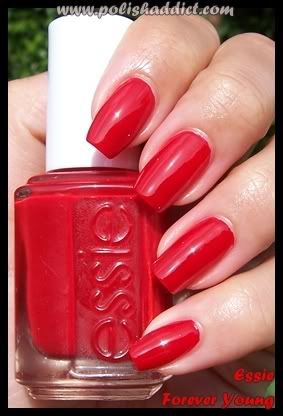
Essie Forever Young polish
I've finally found the perfect red for my skin tone - Essie Forever Young - from the 2008 collection. Big Spender, one of my favorite summer colors (an almost-neon purpley pink), is part of the same collection, so I'm not surprised that I love Forever Young. It doesn't have too much orange or blue...it's really a true red. The formula is highly pigmented as well...I could have gotten by with just one coat (rare when I use deep colors), but did 2 lighter coats along with Essie's 3-Way Glaze (more on that below).

Essie 3-Way Glaze
Can be used as a basecoat, topcoat, and nail hardener. I use it as a base- and top-coat. It takes a while for nails to dry when I do this, but I seriously do not get chips for at least a week (I also keep my nails super short to avoid chips). It's really glossy as well.


Free Sudoku on the Droid
What I love about this game (aside from the fact that it's a FREE app), is that you can choose from a number of levels to play at. The easy level is great for the morning commute, since I can finish the game by the time I reach my stop on the subway. It times each game as well, so you can compete against yourself. Winning the game each morning and trying to beat my time is a great way to start the day on a good note.

The one thing about Brooklyn in the winter, I've learned, is that it gets crazy windy. Especially right around our apartment, which is a block from the water. My old trusty J Crew wool gloves did nothing to protect my hands from the wind. After a bit of research, I bought these gloves from Nordstrom. They're pretty reasonably priced for a great quality pair of gloves, and the reviews are fantastic. They are super warm as well!

Angry Birds
If there is one other game you need in your life, it's Angry Birds. I realize I'm a bit behind on this craze, but I totally get it. The birds...they're angry. These nasty pigs stole their stuff, and they want it back. The pigs are all like 'come and get us b*tches!' and hide in these elaborate fort things. And the crazy birds use kamikaze tactics to bust 'em down. The sound effects are hilarious, and it's just a feel-good kind of game. It's $0.99 on the iPhone but FREE on Android phones.
Photo credit: NYT article linked above

I usually make it a point to avoid this place around the holidays because of the constant throngs of tourists, but recently made an exception to pick up some basics. I love this place! The prices are fab and the quality is pretty great. I am loving my 2 new pairs of the Skinny Straight jean (a great year-round style), and Jeggings (they call them Legging Pants) that are perfectly stretchy and pigmented with a mid-rise, smooth waistband, and all the details of an actual jean (all for a solid $19.90). They're currently giving them away on sale for $9.90 (the Skinny Straights). Oh and Uniqlo does FREE hemming. They also vanity-size like crazy, which is such a mood booster. I'm also obsessed with the Heat Tech products - my savior in this cold snap (especially the tops and socks). If you're in the market for a great stand-in for the classic Patagonia fleece jacket, they have them for men and women, for around $20. New Yorkers - run....Out-of-Towners - make this your first stop on your next visit.

Tuesday, November 30, 2010

In-laws and Almonds


Just back from a wonderful week with the in-laws in Miami. Weather was fab (mid 80s). We ate our way through anything and everything, which is why I've been researching diet cleanses for the past hour. I kid, sort of. But these Cocoa Roast Almonds from Emerald are no joke. MIL and SIL recently discovered them and started buying them by the caseful (apparently they occasionally go on sale at the local Publix for BOGO). Anyway, they are amazing...roasted almonds covered with a light dusting of dark cocoa powder. I think these would make the perfect midday snack, and a great alternative to the handful of candy you might normally grab (oh wait, is that just me?) They also come in Cinnamon, but I prefer the Chocolate. Buy them now!

Wednesday, November 10, 2010

Samsung N230 review


After tons of research and considering the Windows OS, RAM, keyboard size, and screen appearance, I decided to purchase the Samsung N230, which is one of Samsung's newer models. Overall, I am extremely happy with it.

I won't bore you with the specs of the machine, which you can easily find on the retail sites that sell the netbook. I will say that Sammynetbook.com is a great resource if you do decide on a Samsung. Since the N230 was fairly new, I couldn't find many deals or applicable coupons, and ended up purchasing through a back-to-school sale on Buy.com. I used an American Express card for the warranty and purchased through ebates.com for cash back.

Shipping was super fast through Buy.com and they sent several emails notifying me of my order status (much appreciated - especially for such a big purchase). On first handling, the netbook is tiny! It's only 2.2 pounds and the top cover is a shiny black (picked up a ton of fingerprints, but since I planned to use it within a case, this was not an issue). I installed the new RAM straight from the package, and before I even turned the netbook on (it took less than 5 minutes). The initial setup is somewhat complicated, as you have to partition the hard drive (I believe we accepted Samsung's suggested partitioning). Next, I installed MS Office and Stata 11, but not before setting up a network with our existing PC. Husband set this up, and it appeared to be easy (Windows walks you through the steps). The great thing about having the network is that I can share files and programs quickly and on a regular basis, through our home wireless setup.

The netbook itself is easy to type on, with a keyboard that is 93% the size of a standard keyboard (and good spacing between the keys). Samsung boasted a crazy battery life of 7 hours with a 3-cell battery on this thing (and over 13 hours with a 6-cell battery...it's unclear to me whether this is available in the US just yet), and so far it hasn't let me down. Admittedly, I can't comment much on the touchpad since I use a USB mouse, but it does seem a little tricky to get used to. The screen resolution is good - takes a little getting used to - and if I have a particularly long day in front of the screen, my eyes do feel tired. On a typical day, I'll have running Google Chrome, Stata 11, and MS Word, and never feel that anything is slow (I have even opened programs beyond that and they work, despite hearing complaints that W7S only runs up to 3 programs simultaneously.

Obviously, the N230 is a dream to travel with...easily slipping into a tote bag or even a large purse. I never remove it from the case to avoid scratches and damage (although I don't feel that the machine is at all overly delicate). As far as the case, I purchased this option from Slappa. It's a tad heavier and thicker than the ubiquitous neoprene sleeves, but is water-resistant, super durable, and even has my initial on it (ha)!

At $400 retail, it's at the higher end of netbook costs, but despite the price, I'm confident that I bought a solid machine that will last for a while (unlike the pieceofcrap Dell). Don't be put off by the marketing...the Samsung website features two women sitting on a blanket in an urban park, laughing as they glance at the screen. I guess they are hoping that young professional women on-the-go will be the target here? Even though the campaign is flighty, the machine is definitely not.

Tuesday, November 9, 2010

How to Buy a Netbook


So I mentioned that I started going to the NYPL on the regular. Awesome place to set up shop for a day and get some serious work done. Even better that Husband's office is close by, so we started have regular lunches together! What wasn't awesome were the red marks and bruises left behind on my shoulders from lugging around my (godforsakenstupidihateit) Dell laptop along with papers, notebooks, etc. Not to mention the Dell started to seriously crap out on me (killing every new battery I purchased for it). At first I thought about going the refurbished route for another laptop, but then discovered the wonderful world of netbooks.

A netbook is basically a mini-computer. In the 'old days' they were pretty basic and meant for little more then email and basic word processing. Nowadays, these little machines pack a big punch, and can run even statistical software (my main use for the machine). Asus and Acer seems to lead the netbook market, with machines that are priced well. HP and Sony make the 'sexy' machines marketed to trendier peeps. Basically, every computer brand can deliver a netbook to you. So, how to choose?

First, I researched the top-selling netbooks from the last few years. Asus, Acer, Samsung, and Toshiba seemed to lead the pack. Next, I visited my local Best Buy to handle the machines and get a feel for them. From there, I made my decision based on several features:

Windows 7 Starter vs. Windows XP
In was pretty comfortable with Windows XP, and after the whole Vista fiasco, was not jumping on the new Windows OS bandwagon. I found that computers with Windows XP were, in most cases, much cheaper then those with 7 Starter. I also read that Starter can be a memory drain on the computer. However, I was swayed towards Starter when I learned that Windows XP is being phased out by Microsoft...soon they won't even offer support or updates for it! Also, Windows 7 seemed to be relatively bug-free and smooth. I decided to take my chances on the newish operating system.

RAM
To ensure that my netbook would run smoothly on W7S, I knew that I wanted to upgrade the RAM. Most netbooks come with 1 GB RAM standard. This is the available memory that the computer uses to run applications. More RAM = programs starting up quickly and multiple programs running smoothly at the same time.
A quick glance at netbook reviews show upgrades to be fairly common, even for the least tech savvy peeps. Memory is fairly cheap to buy (about $40 for new RAM through online sources like Tigerdirect.com, Crucial.com, or Amazon.com) and easy to install on most computers. Once I decided to do the upgrade myself, I searched for a netbook that had an easily accessed memory slot (on the back, as opposed to underneath the keyboard). You'll want to make sure that the RAM you intend to purchase is fully compatible with the computer (Crucial.com makes this easy to figure out, and their customer service is helpful and quick to respond).

Keyboard size
This is where is pays to read the countless netbook reviews available online. I discovered that on Asus and Acer netbooks, the keys on the keyboard are closer together, and typing tends to be difficult (this was reaffirmed when I saw the machines in-store). There will be always be a learning curve when first using a netbook as your muscle memory adjusts to a smaller, more compact keyboard, but I wanted a quick and easy transition. I discovered that some companies, like Samsung, offered machines with larger-then-average keyboards...newer models boasted full-size keyboards or keyboards greater than 90% the size of the standard. Based on this, I focused my searching on Samsung and Toshiba netbooks.

Screen appearance
Since I would be pretty mobile with my netbook, I decided to seek out a machine with a matte screen that could easily be read in all kinds of light, as opposed to glossy screens that are difficult to read in direct sunlight (similar to my Droid Incredible screen, which I could barely see all summer).

Now keep in mind, a netbook is pretty no-frills...only some ports for the power cord, modem, and USB. To install programs, you'd have to do it over the internet, or set up a network with an existing computer and install the program from there (fairly easy to do, or so Husband tells me). But if portability is the goal, then a netbook would be perfect. Up next...the machine I purchased and a review.